FOR THE COACH WHO SHOWS UP.
GAME DAY STARTS
AT PRACTICE.
Create plays that fit your team. Watch each step, make adjustments, and bring a clear plan to your next practice.
Start with what your team needs. Adjust the play before you teach it.
Live AI · Offensive sets for ages 10–14. Review every play before teaching.
 Try a play firstPass, cut & fill · no account needed
PASS. CUT.
FIND YOUR SPACE.
A simple cue your players can use.
EVERY PART OF THE COURT. EVERY PART OF THE GAME.
Design the right play.
For every situation.
Wherever the ball starts, draw up a plan for the players you have.
Explore the play library
BUILD YOUR OFFENSE
Half-Court
Sets
Create space. Move the ball. Find a good shot.
Try this play
UNDER THE BASKET
Baseline
Inbound Plays
Get the ball in with a scoring look and a safe outlet.
Try this play
FROM THE SIDELINE
Sideline
Inbound Plays
Find your guard. Get organized. Start the next action.
Try this playGO END TO END
Full-Court
Plays
Connect both ends of the floor with a clear plan.
Try this playHANDLE THE PRESSURE
Press
Breaks
Give the ball handler help and a way through the press.
Try this playDRILLS & PRACTICE PLANS
FIND THE RIGHT DRILLS.
BUILD A BETTER PRACTICE.
Close skill gaps with drills for your team’s age group. Turn the ones you need into a custom practice plan.
Drill library with full explainers
Find drills by age, skill, or what your team needs to work on. Get clear diagrams, step-by-step instructions, and coaching cues.
Find a drillPractice plan builder
Add drills, arrange your practice, and set the minutes. Print your plan with the instructions you need on the court.
Build a practice plan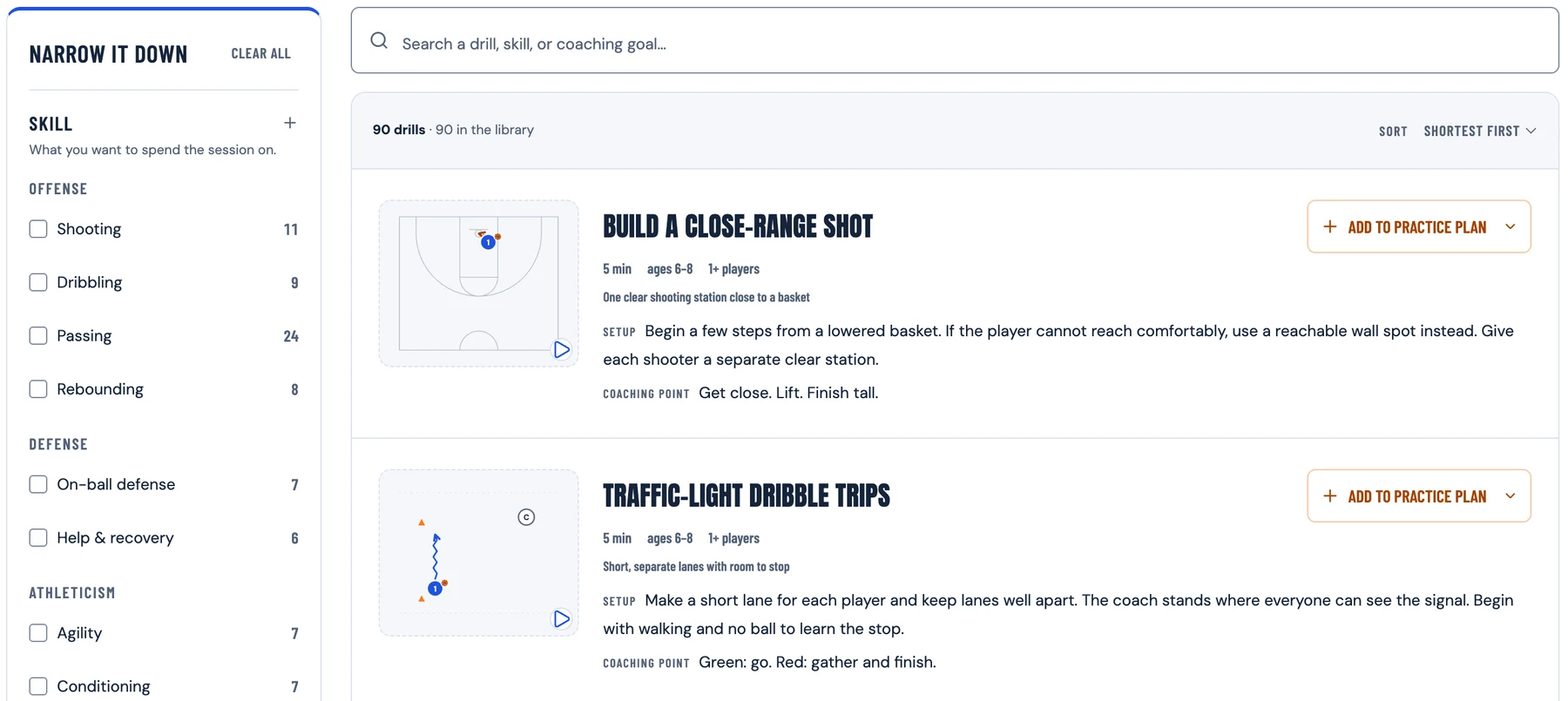
From your playbook to your players
Draw it once.
Coach it all week.
A play to review at home. Clear pages for practice. Your next call, ready on the bench. Put your plays to work in five useful ways.
OUR TEAM.
OUR PLAYS.
- 01Offense / 5-out flow03
- 02Baseline / Box screen up07
- 03Sideline / Safe entry10
- 04Pressure / 1–4 press break12
- 05Late game / Need a basket15
Your team.
Your playbook.
Bring your best plays together. Organize them by situation, add your cues, and put them in the order you teach.
- Plays grouped your way
- A clear teaching sequence
- A book to print or share
Playbook builder available · Print and share formats previewed
The same clear picture, on a page or on a phone.
BRING YOUR NEXT QUESTION
Let’s put it on the court.
Questions coaches ask
What is a basketball play designer?
A basketball play designer is an online tool for drawing player positions, passes, cuts, screens, and dribbles on a court. HoopSketch combines that drawing workspace with AI-assisted drafting and step-by-step playback, so you can turn a coaching idea into a sequence to review, save, and teach.Explore the basketball play designer
How do I draw basketball plays online?
Start with a blank court or an example, place the five players, and choose who has the ball. Draw each pass, cut, screen, or dribble in teaching order, then add the next step. In HoopSketch, you can move players, edit actions, and step through the result before saving your play. AI is optional.Start drawing a basketball play
Can AI generate basketball plays for my team?
Describe your team’s age, where the ball starts, and what you want the play to accomplish. HoopSketch’s current AI generator drafts 5-on-5 offensive sets for ages 10–14, including half-court, baseline, and frontcourt sideline situations. Review the spacing, passing options, and timing before teaching, then refine the actions to fit your team.See how AI play generation works
What do BLOB and SLOB mean in basketball?
BLOB means baseline out of bounds, and SLOB means sideline out of bounds. They describe where a team inbounds the ball. A useful inbound play shows the passer, the receivers’ starting spots, the first passing option, and a safe alternative if that option is covered. Check your competition’s inbound rules before teaching it.Explore baseline and sideline inbound plays
How do I teach basketball plays to beginners?
Teach the starting spots and one decision at a time. Walk through the first pass and cut, ask each player to explain their next job, and add the next action when that part is clear. Use a diagram or paused animation to show the sequence. Then practice a covered first option and add defensive pressure as players become comfortable.Read the guide to teaching basketball plays
How do I build a youth basketball playbook?
Start with a few plays your team can explain and practice, such as a half-court set, a baseline inbound, and a sideline inbound. Save the plays in HoopSketch, choose your team, and arrange them in teaching order with short coaching cues. Team playbook building and previews are available; printing and sharing a complete team playbook are not available yet.Explore the basketball playbook maker
Can I print basketball plays or share them with my team?
Yes. Individual HoopSketch plays can be exported as PNG or SVG images, opened for printing or saving as PDF, and shared through read-only links. Players and assistants can open a shared play and follow its sequence on a phone. Free and Coach exports include a light watermark; Coach Pro removes it.Open a play to print or share
How do I plan a youth basketball practice?
Choose the skill or decision your team needs to work on, then plan activities that build toward it. Include time for explanation, repetitions, water, and review. In HoopSketch, you can add drills and plays to a timed practice plan, adjust the order and minutes, save it to your account, and print the instructions for the gym.Explore the basketball practice planner
Is HoopSketch free to use?
HoopSketch has a free plan for drawing and stepping through basketball plays, exploring starter plays and drills, and making watermarked exports. You can try the available guest AI allowance before signing up. A free account lets you save work within its limits; paid plans provide more AI usage and saved-work capacity. Check pricing for the current allowances.Compare free and paid plans
Does HoopSketch work on phones and tablets?
Yes. You can draw and edit plays, watch each step, browse drills, and use practice plans in a phone or tablet browser. Save a play or practice to your account before switching devices, then sign in to the same account to reopen it. Shared play links give players a view they can use on their phones.Learn about saving plays across devices