
Make the minutes work.
Set your gym time, adjust periods and drills, and see what is still available. If a period runs long, a red warning shows what needs attention.
THE BASKETBALL PRACTICE PLANNER
Turn your gym time into a clear, timed session. Choose your drills, set the minutes, then print your plan or run practice from your phone.
Start with a free account. Already coaching with us? Log in.
Then defense, small-sided games, water & a team huddle.
THE PLAN BEHIND A GOOD PRACTICE
Periods give your practice its shape. Drills sit underneath, with the minutes and coaching notes right where you need them.
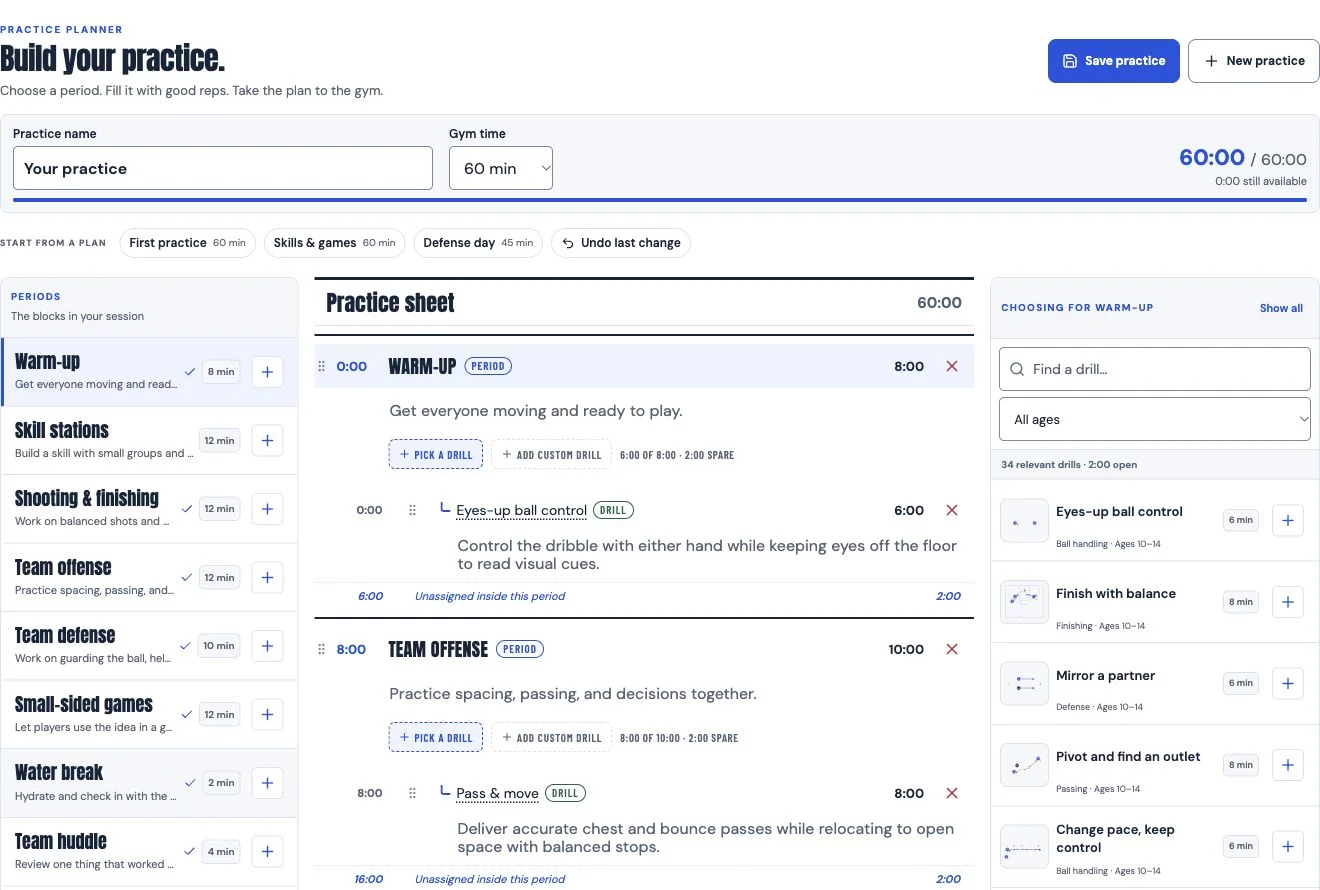
Swipe the preview to see the whole workspace. The planner also has a layout made for phones.
Set your gym time, adjust periods and drills, and see what is still available. If a period runs long, a red warning shows what needs attention.
Add drills to a period, drag them into teaching order, or rotate through stations. Add your own drills and notes when your team needs something different.
Print one page for the clipboard, or include the drill setup, instructions, and coaching cues so everyone knows what to teach.
FROM AN EMPTY HOUR TO A USEFUL PLAN
For rec, AAU, school, and first-time coaches. Start with one thing you want your players to learn.
Name the practice and choose your gym time. Start from a blank session or one of the ready-made plans.
Build the session from warm-up through team huddle. Pick drills by skill and age, add your own, and adjust their order and duration.
Open the saved plan on another device, print your practice sheet, or use the phone runner to move through each activity.
A STARTING POINT, NOT A SCRIPT
Open a starter inside the planner, then adjust it for your players and the space you have.
Control the dribble. Keep your eyes up.
LESS CLOCK-WATCHING. MORE COACHING.
The same plan travels with you. Open a saved practice on your phone for the current drill, its timer, and the next activity. Keep instructions close without carrying a stack of pages.
Build a plan for my teamBEFORE YOU BUILD
What you can build, keep, print, and take to the court.
Compare saved-practice limitsA basketball practice planner organizes a session into timed periods, with drills and coaching notes inside each period. HoopSketch connects that plan to a printable practice sheet and a phone view you can use in the gym.
Yes. Create a free HoopSketch account to build and save one practice plan. Coach and Coach Pro offer more saved practices. You can review the current limits on the pricing page.
Yes. Add a custom drill or a custom period, set its duration, and write the coaching notes your team needs. You can also choose drills with diagrams, setup instructions, and coaching cues from the HoopSketch drill library.
Yes. Print the practice on one page for your clipboard, or print it with the drill instructions attached for assistants running stations.
Yes. Save the plan, sign in to the same account on your phone, and open Run it from your phone. The runner shows the current activity, its timer, and the next activity.
You can keep adding drills. The planner highlights the extra time in red and lets you extend the period to fit, or change the duration of individual drills.
Yes. The guided practice builder asks about age, experience, attendance, goals, gym time, space, and equipment, then creates an editable draft from the drill library. It selects drills instantly without an AI model call or AI-action charge. Review the draft, adjust it, and save it when you are ready.
YOUR NEXT PRACTICE STARTS HERE
Need a drill to build around? Explore basketball drills or read our 60-minute first-practice guide.